Tuesday, March 20, 2012

Readability Test Tool proves your point, "You write like a 3rd grader!"

Next time you find yourself wanting to shout that phrase at the top of your lungs, have some facts to back up your claim. After all, it's one thing to say it, but ima
gine the impact of proving it.

The Readability Test Tool is a quick, simple, AND accurate way to measure the readability of a web page or any pasted text.

Don't believe me? Try it yourself. Post your comments. I'd love to hear what you have to say.

It's fun to test web pages, as you may be surprised by the results.

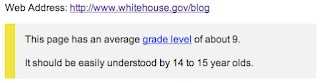
On this day, the White House blog contained several "top stories" that a 9th grader could read. Read? Supposedly. Comprehend? You tell me.

Tuesday, June 15, 2010

Did you Know? Shift Happens! Change to Learn, Learn to Change

It's amazing to see how far the "Did You Know?" message has advanced.


That's well beyond "Shift Happens" from a couple of years back. Watch again, or enjoy it for the first time.


Finally, a new video I've started sharing in education sessions.

Sunday, February 14, 2010

Sexting 101


More great resources are available within this Common Sense Media article.

Tuesday, December 22, 2009

Proactive Protection against Malware, Spyware, Adware and more

Every December, someone inevitably sends me one of those warnings about the latest computer bug that is destined to crash my system. Tonight, instead of hitting the delete key one more time, I decided to reply to my father-in-law with the following proactive message. Please, pass it on. It's a Christmas gift that will just keep on giving!

I deal with these type of virus, malware, spyware, and adware issues on a daily basis, as defined by my job title in my public LinkedIn profile here.

Regarding the annual Snopes.com "Virus Hoaxes and Realities", and specifically the "UPS/FedEx Virus" referenced by everyone who sends these warning messages, I concluded it was once again time to be proactive and help teach the reader to increase their anti-virus protection at home. Many people don't realize that ONLY running your Norton or Symantec anti-virus software to protect your Windows-based operating system will still allow your system to be susceptible to malicious items listed above.

If you aren't running an anti-virus program, you're asking for major trouble. At least download AVG Anti-Virus Free Edition and keep it updated.

For everyone running Windows, I highly recommend users download at least one of the following FREE programs to catch those nasty critters that will eventually do you harm.

Definitely begin with the free product below. Once installed, using it is as simple to use as clicking the Scan button and hoping the "Objects infected:" line doesn't turn red. If that line does turn red, wait till the scan is completed and click the "Remove" button to quarantine those bad guys.


My school district recently recommended adding the free product listed below. As easy as the previous product, simply click the "Scan your Computer..." button and sit back.

In a real world test of these two software, I ran both software on my father-in-laws computer. (I'll just call it a "Christmas Eve" present.) A quick scan of his C-drive with Malwarebytes' Anti-Malware reported one registry key infection, classified as Adware. Installing and running SUPERantispyware immediately afterwards reported 68 additional potential Adware threats, classified as tracking cookies. Does this mean the later product does a more thorough cleaning? I'll let you be the judge. Try this test yourself! And, have a Merry Christmas!
Here are links to articles I've posted about computer protection and anti-virus protection for the home computer user:


Again, if you find any of this information useful, freely pass it on to others.

On a different, but equally important note, if you want to set parental limits on what your children are doing on a computer, consider looking at the Parental Time Control Software Review 2010 TopTenReviews. My cousin swears by ENUFFpc, though I have yet to investigate any of the ten products reviewed.

And, as 2010 approaches, you should catch up on everything you missed by perusing The Digital Decade: 20 Things That Forever Changed Childhood. While on that page, check out the Best of the Decade by Age.

Saturday, December 19, 2009

I'm Back, and Gone Again

What can I say about my last post being eight months ago? I've enjoyed ALMOST every minute. Not that I was ever a tech-junkie who had to be plugged in 365/24/7, but I just decided that I'd do my techie hobbies when the time felt right. About an hour ago, the time felt right. I came across this wicked link that the tech-savvy educator MUST check out.


Hope the wait was worth it!!!

Wednesday, April 22, 2009

Fishing for the Conficker Worm

Conficker - Fishing for the Worm

Based on the latest Conficker Research and countless articles posted in the past month, this page provides the everyday Windows computer user with simple online tools to test for the presence of the Conficker worm on their computer.

Identifying Conficker on your local machine

Here are three quick tests to check your Windows-platform computer.  The following online tests require the Windows user to have a working internet connection and access to any one of the many web browsers, such as Internet Explorer, Firefox, Safari, and Camino. 

Test #1
PC World's Eric Larkin writes that this smart and simple test pulls images from three sites that Conficker is known to block and displays them in a box. Below the box is a guide to interpreting how you see the images -- if they all show up you're in good shape, but if one or more doesn't display it could indicate a Conficker (or other malware) infection.  It's a smart and near-instantaneous test that couldn't be any easier, but keep in mind that if your computer uses a proxy server for Web traffic, which can be the case in some companies, you might be infected and still be able to see the images. (from Source )

Test #2
Can you link to all the sites listed below?


Conficker Research

Contains Test #2 under part I. Description

Abstract of the whitepaper "Know Your Enemy: Containing Conficker" released on March 30, 2009

A 23-page analysis presenting the latest data to repel the Conficker worm

Contains tools and analysis results described in "Know Your Enemy: Containing Conficker"


Q&A of the Day for the Novice Computer User who wants to learn Techie Talk

Q: What is the BIOS?

A: The Basic Input/Output System (BIOS) acts as the motherboard's firmware inside a computer. It contains the first code executed when that computer is powered and serves different functions such as device identification, testing and initialization. This puts the machine into a specific state from where the operating system can take over. (from Source)

Wednesday, January 7, 2009

Lose those old pill bottles!

Everybody has one. That pill bottle with one or more colored tablets with a name or number(s) on either side. Wouldn't it be nice to be able to quickly, and accurately, identify these dangerous "hanger-ons"?

Seems the holidays are synonymous will illness this year. Everyone in my family has been sick at least once since the Winter Break. This sad fact drove me to get busy clearing at the various pill bottles on our bathroom shelf. That's when I found the Drug.com's Pill Identification Wizard in this linked post.

Of course, I have since tagged this link using my delicious bookmarks.


Are you using delicious? You should try it. And, once there, add me to your network. Just search for "rookiedad". Hope you find some of my 1,000+ bookmarks useful.

Wednesday, December 31, 2008

How to create a "My Map" in Google Maps

I'm amazed, confused, and eventually annoyed when other educators tell me there is nothing educational to be gained from a site like YouTube. Give me a break! That kind of mindset enrages me more than you could comprehend.

Saturday, December 27, 2008

Have Skills? Need Resources!

I just read a short Teach42 post titled Life on the cutting edge. I hadn't seen this blog before, and I think I've become an instant fan. I found the comments from other readers to be insightful, reflective, and more-than-occasionally inspiring. If you've even wondered where you might place yourself on the bell curve of technology integration, or plain technology understanding, you will find the post mentioned above very interesting. And yes, I will go back right now to nominate that blog for an eduBlog award using the link on the right side banner of the Teach42 site.

Friday, December 19, 2008

The Future of the Written Word?

Now that the Fall semester is over, I'm catching up on the multitude of blogs that I haven't had time to read in the past weeks.  Can you say Google Reader?

If you're not using the Google Reader, you really should.  It has a new look!  When it comes to quickly accessing (and sharing) your favorite Internet readings (blog posts, news articles, etc.), you can't do better than this tool.  Don't miss the Share feature to pass the best reading on to your extended Internet family.

Maybe you still enjoy sitting down with a good book.  If you're a bookworm who has actually stepped into a library in the last year, this next link will make you think you have entered the ancient Library of Alexandria.  Scroll down to Section II at this link to get a quick overview, then check out the Google Book Search.

Finish with the anticipated changes expected by the groundbreaking settlement between Google and publishers.

Tuesday, December 9, 2008

Happy Birthday!


What a pretty girl! I love you.

Thursday, December 4, 2008

Ethical Hunting

Some of my colleagues just discovered that I love the outdoors and enjoy hunting when I get a chance.  Well most where impressed that I was into archery, a handful were probably disgusted by the idea of killing ( I mean, Harvesting ) an animal.  Those few also didn't partake of the Venison Chili that I shared at work a few days ago.  Did I mention that I do all the cooking in my house.  And, yes, my wife enjoys my venison recipes with or without Shiraz.

Just so you understand that I'm not one of those crazy "shoot anything that moves" hunters, I thought I would provide this short unedited clip, shot with my digital video camera three weeks ago.  I guess you could say this gives a visual record of my love for technology combines with my love for hunting.  Needless to say, I could have easily have arrowed this young two-point buck as it stood only 15 yards away.  It's amazing how he appears to be much further away.  I hope you get some ideas for becoming your own videographer from this clip.  I'm finding that it's easy to film yourself with an outstretched arm.  I've taken many great stills from various angles using this same technique with wonderful results.  Next time you don't have someone else around to assist, try the do-it-yourself approach.

Till next time, enjoy this experimental video.  Until the 0:50 mark, I'm zoomed into the young buck.  After that, I zoom out, switch hands, and extend my left arm back behind my shoulder to create an "over the shoulder" moment.  Sorry for the less-than-great quality.  It's the technique that I found interesting.


Friday, November 28, 2008

A Must-Read for All Educators

Simply telling it like it is.

How many times do I have to say it.

"Engage them, don't enrage them."

http://weblogg-ed.com/2008/new-macarthur-study-must-read-for-educators/

Thursday, November 27, 2008

Recording Tools for Capturing and Sharing on the National Day of Listening

Want an alternative to that tedious day-after Thanksgiving shopping spree?

How about learning more about someone close to you by participating in the first annual StoryCorps National Day of Listening on November 28, 2008. When I first read about this in Samantha Gross' article linked here, I immediately thought of all the cool tools currently available that will allow someone to capture audio and/or video of family members and close friends before they are forgotten.

Here's my short list of Tools for Capturing the Moment:
  1. For the Apple enthusiast, simply turn on your Photo Book video and have at it.
  2. For the Windows user, how about spending $29.95 for the LifeCam VX-1000 and use it in combination with a free download of Windows Movie Maker. Simply connect the USB webcam, open Movie Maker and (under Movie Tasks) select #1 Capture Video from "video device". Your intelligent computer will find the webcam and you can just start recording.
  3. For additional free audio/video recording (also referred to by me as "capture") software, consider downloading the trial versions of SnagIt or Jing. With either one, you'll think Christmas has come early. And, you will will to explore the possibilities of these cool tools before the next gathering of friends and/or family.

Tell next time, have fun!

I've got to run. Turkey is on the kitchen counter!!!

Pass the Yammer!

Social networking sites are great when used properly and on your own time (versus during working hours). Anyone who frequents Twitter can tell you how disappointing it is to find that site blocked within JCPS. However, it is understandable. But what if a Twitter-like site that was more Work-Related existed? After all, people could (and should) be twitting about work sometimes. Right? So, how do you get your up-to-the-minute social networking fix AND impress your boss at the same time? The answer is in one word.


Yammer is social networking that asks "What are you working on right now?" And, it's as easy to use as linking to the Video Tour that explains the basics.

Want to learn more? Read some of either The Yammer Blog or The How To Guide right now, if they're not blocked by that pesty firewall. Otherwise, try to wait until you get home. Either way, prepare to be impressed.

Can you see Yammer taking the place of a ton of annoying email that fills your mailbox on a daily basis. I can. I'm so excited about the possibilities of Yammer that I've already created the group for my organization, invited the members, and anxiously await the return to work after the Thanksgiving Holiday.
Pass the turkey, I need to keep up my strength!

Monday, November 17, 2008

Internet Security begins with Common Sense

Seems I've been spending a great deal of time dealing with virus protection, eliminating Spyware, and training others to increase their computer security. In this post I will pass on some web sites that I like to use to increase awareness of these issues. I hope you will find something eye-opening and useful amongst this short post.

Begin by taking the SonicWall Phishing and Spam IQ Test to gauge your ability to identify real versus fraudulent emails.

I recently found some great common sense articles on the WebTools&Tips site. By accident, I happened across the article Internet Security Tips: Look Hard at URL destination before you Click it. This is just one in the series of Simple Security Tips to fortify your Internet Security. And, a great compliment to this series, you shouldn't pass over the "Related Webtools and Tips..." found at the end of each article.


I'm discovering that the average computer user either doesn't see the importance of, or simply doesn't make the time to, look before clicking. A simple click on the wrong link, image, email, et cetera, can result in a variety of problems. These include viruses, spyware, and other evil little critters. The average user can save themselves some pain by learning to deal with these crises before they ruin your day, your files, and your mood.

For example, being aware of sites like Snopes can give you insight into Virus Hoaxes & Realities that are likely to threaten your system. Snopes recently posted a nice summary of the UPS/FedEx Delivery Failure virus that is certain to affect someone you know before this holiday season is over. Don't let it get you.

Become familiar with one or more Spyware removal Tools. I especially like the resources to be found at CERT. Another resource that I have used is WebToolsandTips.com

However, if you don't feel comfortable attempting to removing spyware from your computer, you can find a techie who feels comfortable assisting you in solving these type of problems. At least take the time to learn about what is infecting your system by simply doing Google searches that includes some variation of "remove, removal, removing" followed by the name of virus or spyware that has invaded the computer.

As I said at the beginning of this post, I hope you found something eye-opening and useful. Better security leads to better peace of mind. Enjoy that!

Monday, November 10, 2008

Change Congress

For those of you eligible to vote in U.S. Congressional elections, do your part to Change Congress.

Help Build the Momentum

My next post will return to tech integration ideas in education.

Sunday, November 9, 2008

Hunting, Dear

Today had it all, birthday, anniversary, deer hunting, and broadcasting our support of Public Radio and WFPL. Hear our message at the end of this post.

Isabel is 11 months old tonight and pulled herself up to a standing position with the support of the coffee table. It won't be long till she's walking!

Sherriann and I have enjoyed 12 wonderful years together. As Isabel is still getting over a recent bout with a cold, I surprised Sherri by picking up dinner at one of our favorite restaurants, Stony River. We've just dined on Caesar salad, a pair of 10 oz filets "Oscar style" (crabmeat on top) with a side of mashed cinnamon sweet pototoes. Later we'll share our desserts. Yum.

And all this after I went hunting this morning and harvested a deer for our new freezer. I was home by 10:30am and had processed the meat by 4pm. Thanks again for sending me to the woods, sweetie. And yes, I let the little buck walk on by.

My morning hunt on dad's farm was almost a bust. Turkeys were landing all around as dawn broke.

Thank goodness the the 3D camo, or they would have raised a ruckus and scared all the deer away.

At daybreak, I was sitting on the ground with my back against a large cedar for less than 30 minutes, when I suddenly heard hooves stomping the ground directly behind me. This was followed by a deer blowing. I waited a moment before slowly turning my head, hoping the cedar and my camouflage would conceal my location. Through the underbrush, I spied a pair of does bobbing their heads trying to see what that odd shape was under the cedar tree near their bedding area. They didn't look for long, deciding instead to leave the way they came.


As for me, I figured that my morning hunt was wasted, so I grabbed my gear and headed out of the woods the same way the deer had exited. As I began my 200 yard walk down the grassy meadow toward the recently harvested corn field where I had parked, I happened to look up in time to see the two does jumping the fence between the meadow and corn stubble. They loped into a tree-lined gulley about 250 yards away.

Immediately, eight deer came blasting out of the gulley, startled by the commotion these two were making. The herd moved reminiscent of the 3th and 4th turns at Churchill Downs' Kentucky Derby. They made a 100-yard-wide counter-clockwise circle, first away, then toward me. I couldn't believe my eyes. In turn, they each vaulted over the fence and, suddenly slowing to a trot, preceded up the hillside where I had smartly sat down to watch the race. I now had plenty of time to take the Winchester 243 back out of the case, insert the clip and chamber a round, all while taking in the size of the seven does and the trailing 2-point buck.



With the herd nearing up the hill toward my 2 o-clock position, I waited until the largest doe was 40 yards away and still slightly lower than my position. A misfire would safely lodge in a distant ridge just beyond the meadow. No need to worry. My shot was true, and the deer was down.
It's Daddy and hubby time.


Our WFPL message of support.

Saturday, November 8, 2008

Catching up with October

Seems October was so busy, I never got around to posting anything about technology in education, or the family. Here's the quick family update. After all, family comes first.

Isabel was a flower for Halloween. What a cutie!

Sunday is my 12th anniversary. Love you, honey. It is also Isabel's 11month birthday. Love my baby!

It's been over a month since my last post. I will begin posting regularly beginning this week. The past 12 weeks have been overwhelmingly productive. My quasi-title "go-to-guy for all things tech" has kept me jumping through hoops at work. I'll loved learning the hardware side of technology, although it has kept me from exploring much in the way of software. I'll share all later.

For now, Sherri is getting over her cold. (I had it first. Sorry, sweetie.)
It's a loving wife who says "go deer hunting" the morning of our anniversary. (Is this a trick?) I'll be sure to surprise her with something out-of-the-ordinary when she least expects it. She deserves it for all she does.

Looking forward to sharing the latest tech integration ideas. Expect to read about videoconferencing, Skype, some more Web20 tools, and detailing the creation of a retro-computer lab that began with the simple idea of just increasing the RAM in some older computers. I had no idea where that one task would lead. I'm changing an old cliche to say, "If it ain't broke....make it better."

Stay tuned and Thanks again for reading!